coderqh
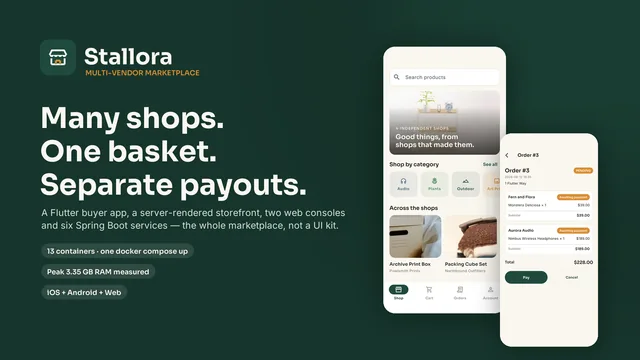
Stallora
$133Flutter Multi-Vendor E-Commerce Platform with Spring Boot Microservices
Choose one square image of at least 1024 px and download every iOS and Android launcher icon a Flutter app needs, already in the folders your project uses.
It resizes the image you choose, in this browser tab; it does not draw or design an icon, and the image is never uploaded.
| Folder | Files | Pixels |
|---|---|---|
ios/Runner/Assets.xcassets/AppIcon.appiconset | 21 PNG files and Contents.json | 20 to 1024, not transparent |
android/app/src/main/res/mipmap-* | ic_launcher.png in 5 densities | 48, 72, 96, 144, 192 |
android/app/src/main/res/drawable-* | ic_launcher_foreground.png, adaptive icon | 108, 162, 216, 324, 432 |
android/app/src/main/res/mipmap-anydpi-v26 | ic_launcher.xml, adaptive icon | - |
android/app/src/main/res/values | colors.xml with the background color | - |
playstore | ic_launcher-playstore.png, for the store listing | 512, not transparent |
assets/icon | app_icon.png, the source image | 1024 |
Each file and the devices Contents.json uses it for. The App Store icon is the 1024 px one.
| File | Pixels | Used for |
|---|---|---|
Icon-App-20x20@2x.png | 40 | iPhone 20 pt @2x, iPad 20 pt @2x |
Icon-App-20x20@3x.png | 60 | iPhone 20 pt @3x |
Icon-App-29x29@1x.png | 29 | iPhone 29 pt @1x, iPad 29 pt @1x |
Icon-App-29x29@2x.png | 58 | iPhone 29 pt @2x, iPad 29 pt @2x |
Icon-App-29x29@3x.png | 87 | iPhone 29 pt @3x |
Icon-App-40x40@2x.png | 80 | iPhone 40 pt @2x, iPad 40 pt @2x |
Icon-App-40x40@3x.png | 120 | iPhone 40 pt @3x |
Icon-App-57x57@1x.png | 57 | iPhone 57 pt @1x |
Icon-App-57x57@2x.png | 114 | iPhone 57 pt @2x |
Icon-App-60x60@2x.png | 120 | iPhone 60 pt @2x |
Icon-App-60x60@3x.png | 180 | iPhone 60 pt @3x |
Icon-App-20x20@1x.png | 20 | iPad 20 pt @1x |
Icon-App-40x40@1x.png | 40 | iPad 40 pt @1x |
Icon-App-50x50@1x.png | 50 | iPad 50 pt @1x |
Icon-App-50x50@2x.png | 100 | iPad 50 pt @2x |
Icon-App-72x72@1x.png | 72 | iPad 72 pt @1x |
Icon-App-72x72@2x.png | 144 | iPad 72 pt @2x |
Icon-App-76x76@1x.png | 76 | iPad 76 pt @1x |
Icon-App-76x76@2x.png | 152 | iPad 76 pt @2x |
Icon-App-83.5x83.5@2x.png | 167 | iPad 83.5 pt @2x |
Icon-App-1024x1024@1x.png | 1024 | App Store |
unzip -o app-icons.zip -d path/to/your_app, where your_app is the folder with pubspec.yaml. Do not drag the folders in with the Finder: it replaces a folder instead of merging it, and would remove the rest of android/.flutter clean, then flutter run. The new icon shows on the home screen.playstore/ic_launcher-playstore.png in Play Console. The 1024 px iOS icon goes to the App Store with the build.The same icons from the package: put the source image from the zip in your project, add this to pubspec.yaml, and run dart run flutter_launcher_icons.
dev_dependencies:
  flutter_launcher_icons: ^0.14.3

flutter_launcher_icons:
  android: true
  ios: true
  image_path: "assets/icon/app_icon.png"
  remove_alpha_ios: true
  background_color_ios: "#FFFFFF"
  adaptive_icon_background: "#FFFFFF"
adaptive_icon_foreground: "assets/icon/app_icon.png"Something else? Email support@coderqh.com.
No. Your image never leaves this browser tab: the resizing and the zip both happen on your device, so the tool also works offline once the page has loaded.
App Store Connect refuses an app icon with transparency, and Google Play shows its 512 px icon on a solid square. Those files are filled with the background color you pick; the Android launcher icons keep their transparency.
Android 8 and later shape the icon to fit the phone, so the app needs a foreground layer and a background color. The option adds both, with the foreground inset by 16% so your artwork stays inside the area every shape keeps.
No. The zip holds the same files that package writes, in the same folders. If you would rather run the package, the configuration below gives the same result, and the zip includes the source image at assets/icon/app_icon.png.
A square PNG of 1024 by 1024 px with the artwork centered and some space around it. A larger image is scaled down; a wider or taller one is cropped to its center square. Images smaller than 1024 px are refused, because enlarging them makes the App Store icon blurry.
Each of these is a complete Flutter app for iOS and Android: full source, one-time price, ready for the icon set you just made.